SELECT
     SU.SystemUserId
     ,SU.DomainName
     ,SU.FullName
     ,SUO.LastAccessTime
FROM SystemUser SU
  INNER JOIN [MSCRM_CONFIG].[dbo].[SystemUserOrganizations] SUO ON SUO.CrmUserId = SU.SystemUserId
  INNER JOIN [MSCRM_CONFIG].[dbo].[SystemUserAuthentication] SUA ON SUA.UserId = SUO.UserId
ORDER BY SU.DomainName
Showing posts with label MSCRM. Show all posts
Showing posts with label MSCRM. Show all posts
Tuesday, October 4, 2011
When was the last time a user logged in?
Recently, I was asked to look into which users where using our production MSCRM 2011 environment. Prior to MSCRM 2011, you could get a rough idea of which users where accessing CRM by looking through IIS logs. However, this was tedious and it was not very accurate, since the Outlook Client traffic is included in the IIS logs. Luckily, Microsoft made life easier with CRM 2011 and included a column named LastAccessTime in the SystemUserOrganizations table of the MSCRM_CONFIG database. To get the LastAccessTime for your users, you can run the query below from your Organization database, #ORGNAME#_MSCRM.
I want to credit Results on Demand who posted the query that inspired mine. You can see their version of the query that runs from the MSCRM_CONFIG database at http://www.resultondemand.nl/support/blog/post/How-to-get-the-last-login-date-and-time-of-a-CRM-user-(MSCRM-2011).aspx


Sunday, October 2, 2011
When was the last time a report ran in MSRM?
I was recently asked if it was possible to determine the last time a MSCRM report was run. To get this information you will need read access to the report server db and read access to the Reports table of your CRM instance. You can then run the this query
Running this query will return a result set that looks like the below report but with more data.
On thing to keep in mind when you report is that by default, SSRS log entries are kept 60 days. Entries that exceed this date are removed at 2:00 A.M. every day. On a mature installation, only 60 days of information will be available at any given time. You can read more about the SSRS execution log at http://msdn.microsoft.com/en-us/library/ms159110.aspx.
--NOTE!!! This query is designed to run on SSRS 2008 R2
--Replace #REPORT SERVER DB# with the name of the your SSRS DB
--Replace #CRM DB NAME# with the name of the your CRM DB
USE #REPORT SERVER DB#

;WITH theExecution AS (
  SELECT
    C.Name as reportid,
    E.TimeEnd,
    ROW_NUMBER() OVER (PARTITION BY C.Name ORDER BY E.TimeEnd DESC) rowNumber
  FROM Executionlog E
  INNER JOIN Catalog C on C.ItemID = E.ReportID AND C.Type = 2 AND C.Path LIKE '#CRM DB NAME#%'
  AND E.Format = 'RPL'
), numberTimesRun AS (
  SELECT
  te.reportid,
  COUNT(*) NumberTimesRan
  FROM theExecution TE
  GROUP BY te.reportid
)
SELECT
R.ReportId,
R.Name,
R.FileName,
R.ModifiedOn LastModifiedOn,
TE.TimeEnd LastTimeGenerated,
NTR.NumberTimesRan
FROM [RGA_MSCRM].[dbo].Report R
  LEFT OUTER JOIN theExecution TE ON TE.reportid = r.ReportId AND TE.rowNumber = 1
  LEFT OUTER JOIN numberTimesRun NTR ON NTR.reportid = r.ReportId
WHERE
R.ispersonal = 0 --Exclude Personal reports
ORDER BY R.Name
| ReportId | ReportName | FileName | LastModifiedOn | LastTimeGenerated | NumberTimesRan |
| 7AD95C7E-737A-DF11-AB37-00145EED82FA | Account Distribution | Account Distribution.rdl | 2011-07-24 02:11:35.000 | NULL | 80 |
| AAA85E84-737A-DF11-AB37-00145EED82FA | Account Distribution Detail | Account Distribution Detail.rdl | 2011-07-24 02:11:35.000 | NULL | 80 |
| 82D95C7E-737A-DF11-AB37-00145EED82FA | Account Overview | Account_Overview.rdl | 2011-09-30 20:06:08.000 | 2011-09-30 15:15:07.290 | 221 |
| ... | |||||
Saturday, October 1, 2011
What are the valid RootComponent types in the solution.xml file?
Recently, I needed to add a new RootComponent node to the soltuion.xml file for a Plugin Assembly, but I did not know the correct value for the type attribute. Unfortunately, a look at MSDN and Technet for the SDK didn't turn up any anything for the schema of the solution.xml file and a Google search turned up limited information for a few of the valid values. Well, I was sure that this information was stored somewhere in the CRM database. The query below is the result of my efforts.
Running this query against the CRM database will give you a list of all the valid values for the type attribute of RootComponent node. For reference, I have included the results I got when I ran the above query.
SELECT
SM.AttributeValue [type],
SM.Value [Description]
FROM StringMap SM
WHERE
SM.AttributeName = 'componenttype'
AND
SM.ObjectTypeCode = 7103
- <RootComponent type="1" is for a Entity
- <RootComponent type="2" is for a Attribute
- <RootComponent type="3" is for a Relationship
- <RootComponent type="4" is for a Attribute Picklist Value
- <RootComponent type="5" is for a Attribute Lookup Value
- <RootComponent type="6" is for a View Attribute
- <RootComponent type="7" is for a Localized Label
- <RootComponent type="8" is for a Relationship Extra Condition
- <RootComponent type="9" is for a Option Set
- <RootComponent type="10" is for a Entity Relationship
- <RootComponent type="11" is for a Entity Relationship Role
- <RootComponent type="12" is for a Entity Relationship Relationships
- <RootComponent type="13" is for a Managed Property
- <RootComponent type="20" is for a Role
- <RootComponent type="21" is for a Role Privilege
- <RootComponent type="22" is for a Display String
- <RootComponent type="23" is for a Display String Map
- <RootComponent type="24" is for a Form
- <RootComponent type="25" is for a Organization
- <RootComponent type="26" is for a Saved Query
- <RootComponent type="29" is for a Workflow
- <RootComponent type="31" is for a Report
- <RootComponent type="32" is for a Report Entity
- <RootComponent type="33" is for a Report Category
- <RootComponent type="34" is for a Report Visibility
- <RootComponent type="35" is for a Attachment
- <RootComponent type="36" is for a Email Template
- <RootComponent type="37" is for a Contract Template
- <RootComponent type="38" is for a KB Article Template
- <RootComponent type="39" is for a Mail Merge Template
- <RootComponent type="44" is for a Duplicate Rule
- <RootComponent type="45" is for a Duplicate Rule Condition
- <RootComponent type="46" is for a Entity Map
- <RootComponent type="47" is for a Attribute Map
- <RootComponent type="48" is for a Ribbon Command
- <RootComponent type="49" is for a Ribbon Context Group
- <RootComponent type="50" is for a Ribbon Customization
- <RootComponent type="52" is for a Ribbon Rule
- <RootComponent type="53" is for a Ribbon Tab To Command Map
- <RootComponent type="55" is for a Ribbon Diff
- <RootComponent type="59" is for a Saved Query Visualization
- <RootComponent type="60" is for a System Form
- <RootComponent type="61" is for a Web Resource
- <RootComponent type="62" is for a Site Map
- <RootComponent type="63" is for a Connection Role
- <RootComponent type="70" is for a Field Security Profile
- <RootComponent type="71" is for a Field Permission
- <RootComponent type="90" is for a Plugin Type
- <RootComponent type="91" is for a Plugin Assembly
- <RootComponent type="92" is for a SDK Message Processing Step
- <RootComponent type="93" is for a SDK Message Processing Step Image
- <RootComponent type="95" is for a Service Endpoint
Friday, July 15, 2011
CRM 2011 - Caller is not an owner for SubscriptionID Error
Over the past few weeks my team has been working on reviewing and revising our CRM environment in preparation to migrate to CRM 2011. As part of the preparation we have been testing the offline client and in doing so one of my devs ran into the error message of "Caller 2222222-2222-2222-2222-22222222 is not an owner for SubscriptionID 00000000-0000-0000-0000-000000000000" when attempting to go offline.

Now this odd as my devs CallerId\SystemUserId was 11111111-1111-1111-1111-111111111111 and not 2222222-2222-2222-2222-22222222, which is the SystemUserId for our TestUser1. So why was the outlook client making a call as another user? Well I after doing some initial investigation I conclude that it would just be faster to reconfigured the Outlook client, so we started the configuration wizard and typed in our server URL and hit the ‘Test Connection …’ button. However, when it finished it showed that my dev authenticated as DOMAIN\TestUser1.

What! How is this happening? So I ask my dev, "Are you logged in as DOMAIN\TestUser1?" To which he replies, "No." Okay, so how was the Outlook client getting another user’s credentials when it authenticates against the CRM server. Well it turned out that my dev had told IE to store the user name and password for Domain\TestUser1 when he was testing the CRM 2011 web client. We found this by going to Control Panel > User Accounts

And then clicking the ‘Manage Passwords’ button on the Advanced tab, which displays after clicking ‘User Account’

Clicking the ‘Manage Passwords’ button displays a form that lists sites that have user name and passwords saved.

When I clicked on the entry for crm.domain.com I saw the following

So to remove the entry we just selected the row for crm.domain.com and clicked the ‘Remove’ button. Once this was done we were able to reconfigure the CRM Outlook client and have it authenticate as my dev. He wa then was able to go offline with the CRM 2011 Outlook client.

Now this odd as my devs CallerId\SystemUserId was 11111111-1111-1111-1111-111111111111 and not 2222222-2222-2222-2222-22222222, which is the SystemUserId for our TestUser1. So why was the outlook client making a call as another user? Well I after doing some initial investigation I conclude that it would just be faster to reconfigured the Outlook client, so we started the configuration wizard and typed in our server URL and hit the ‘Test Connection …’ button. However, when it finished it showed that my dev authenticated as DOMAIN\TestUser1.

What! How is this happening? So I ask my dev, "Are you logged in as DOMAIN\TestUser1?" To which he replies, "No." Okay, so how was the Outlook client getting another user’s credentials when it authenticates against the CRM server. Well it turned out that my dev had told IE to store the user name and password for Domain\TestUser1 when he was testing the CRM 2011 web client. We found this by going to Control Panel > User Accounts

And then clicking the ‘Manage Passwords’ button on the Advanced tab, which displays after clicking ‘User Account’

Clicking the ‘Manage Passwords’ button displays a form that lists sites that have user name and passwords saved.

When I clicked on the entry for crm.domain.com I saw the following

So to remove the entry we just selected the row for crm.domain.com and clicked the ‘Remove’ button. Once this was done we were able to reconfigure the CRM Outlook client and have it authenticate as my dev. He wa then was able to go offline with the CRM 2011 Outlook client.
Friday, July 8, 2011
Decreasing 401 Responses
Did you know that Microsoft's CRM services team has a blog that has a wealth of information about CRM performance and other odds and ends? Hopefully you did and you saw their post titled How to Decrease 401 Responses in CRM Web Traffic. I read through it and applied their suggestions and my IIS logs now reflect about a 35% reduction in requests. That is huge considering that my user base is global and traffic is at a premium on our network. I recommend you check out the Dynamics CRM in the Field blog at https://community.dynamics.com/product/crm/crmtechnical/b/crminthefield/default.aspx and also take a look at their How to Decrease 401 Responses in CRM Web Traffic post.
Wednesday, June 22, 2011
CRM 2011 - How to filter the 'Add Existing' button on a sub-grid. (A.K.A. filtered sub-grid look up)
Update 07 September 2011
If you are looking for a simpler solution that only allows for changing the fetchXML used by the lookup control check out James's post at CRM 2011 Change SubGrid FetchXML.
I had hoped that Microsoft would provide support for applying custom views to the lookup used by sub-grids, since you can use the Xrm.Page.ui.addCustomView method to apply a custom view to a lookup control. Unfortunately, the Xrm.Page.ui.addCustomView method only works for lookup controls. So for the past three full days I have spent my time trying to understand how the addCustomView method works so I could extend it to support sub-grids. The code below does this; however, IT HAS BEEN TESTED MINIMALLY and thus may not address your particular case. If you find issues or improve this please let me know so I can share it with the rest of the community.
If you are looking for a simpler solution that only allows for changing the fetchXML used by the lookup control check out James's post at CRM 2011 Change SubGrid FetchXML.
I had hoped that Microsoft would provide support for applying custom views to the lookup used by sub-grids, since you can use the Xrm.Page.ui.addCustomView method to apply a custom view to a lookup control. Unfortunately, the Xrm.Page.ui.addCustomView method only works for lookup controls. So for the past three full days I have spent my time trying to understand how the addCustomView method works so I could extend it to support sub-grids. The code below does this; however, IT HAS BEEN TESTED MINIMALLY and thus may not address your particular case. If you find issues or improve this please let me know so I can share it with the rest of the community.
//Warning: This code below is not supported by Microsoft

//Place this code in the onload event of a form containing a sub-grid that you wish to filter

window.attachEvent("onload", function() {
  function locAssocObj_custom(iType, sSubType, sAssociationName, iRoleOrdinal, additionalParams, showNew, showProp, defaultViewId, customViews, allowFilterOff, disableQuickFind, disableViewPicker, viewsIds) {
    var lookupItems = LookupObjects(null, "multi", iType, 0, null, additionalParams, showNew, showProp, null, null, null, null, defaultViewId, customViews, null, null, null, null, allowFilterOff, disableQuickFind, disableViewPicker, viewsIds, false);
    if (lookupItems) lookupItems.items.length > 0 && AssociateObjects(crmFormSubmit.crmFormSubmitObjectType.value, crmFormSubmit.crmFormSubmitId.value, iType, lookupItems, iRoleOrdinal == 2, sSubType, sAssociationName)
  }

  if (Mscrm.GridRibbonActions.addExistingFromSubGridAssociated) {
    Mscrm.GridRibbonActions.addExistingFromSubGridAssociated_org = window.Mscrm.GridRibbonActions.addExistingFromSubGridAssociated;

    window.Mscrm.GridRibbonActions.addExistingFromSubGridAssociated = function(gridTypeCode, gridControl) {
      if (IsNull(gridControl)) {
        throw Error.argument("value", "gridControl is null or undefined")
        return;
      }

   //Check if a filtered grid.  If not call default method
      if (IsNull(gridControl._element.isFiltered) || !gridControl._element.isFiltered) {
        Mscrm.GridRibbonActions.addExistingFromSubGridAssociated_org(gridTypeCode, gridControl)
      } else {
        var e = document.getElementById(gridControl._element.id);

        var showNew = (IsNull(e.showNew) ? null : e.showNew);
        var showProp = (IsNull(e.showProp) ? null : e.showProp);
        var allowFilterOff = (IsNull(e.allowFilterOff) ? null : e.allowFilterOff);
        var disableQuickFind = (IsNull(e.disableQuickFind) ? null : e.disableQuickFind);
        var disableViewPicker = (IsNull(e.disableViewPicker) ? null : e.disableViewPicker);
        var customViews = (IsNull(e.customViews) ? null : e.customViews);
        var defaultViewId = (IsNull(e.defaultViewId) ? null : e.defaultViewId);
        var viewsIds = null;

        var $v_0 = gridControl.getParameter("relName"), $v_1 = gridControl.getParameter("roleOrd"), $v_2 = false;

        switch (gridTypeCode) {
          case Mscrm.EntityTypeCode.List:
            switch ($v_0) {
              case "campaignactivitylist_association":
                window.parent.locAssocObjCampaignActivity(gridTypeCode, "", $v_0, $v_1);
                break;
              case "campaignlist_association":
                locAssocObjCampaign(gridTypeCode, "subType=targetLists", $v_0, $v_1);
                break;
              case "listlead_association":
                window.parent.locAssocObjLead(gridTypeCode, "", $v_0, $v_1);
                break;
              case "listcontact_association":
                window.parent.locAssocObjContact(gridTypeCode, "", $v_0, $v_1);
                break;
              case "listaccount_association":
                window.parent.locAssocObjAccount(gridTypeCode, "", $v_0, $v_1);
                break;
              default:
                $v_2 = true;
                break
            }
            break;
          case Mscrm.EntityTypeCode.Campaign:
            switch ($v_0) {
              case "campaignlist_association":
                locAssocObjList(gridTypeCode, "subType=targetLists", $v_0, $v_1);
                break;
              case "campaigncampaign_association":
                locAssocObjCampaign(gridTypeCode, "", $v_0, $v_1);
                break;
              default:
                $v_2 = true;
                break
            }
            break;
          case Mscrm.EntityTypeCode.Product:
            switch ($v_0) {
              case "productsubstitute_association":
                locAssocObjProduct(gridTypeCode, "", $v_0, $v_1);
                break;
              case "productassociation_association":
                locAssocObjProduct(gridTypeCode, "", $v_0, $v_1);
                break;
              case "campaignproduct_association":
                locAssocObjCampaign(gridTypeCode, "", $v_0, $v_1);
                break;
              case "competitorproduct_association":
                window.parent.locAssocObjCompetitor(gridTypeCode, "", $v_0, $v_1);
                break;
              default:
                $v_2 = true; break
            }
            break;
          default:
            $v_2 = true;
            break
        }
        if ($v_2) {
          var $v_3 = locAssocObj_custom;
          var additionalParams = null;
          //$v_3(gridTypeCode,"",$v_0,$v_1, additionalParams)
          $v_3(gridTypeCode, "", $v_0, $v_1, additionalParams, showNew, showProp, defaultViewId, customViews, allowFilterOff, disableQuickFind, disableViewPicker, viewsIds);
        }
      }
    }
  }
});

function addSubgridCustomView(subgridID, entityTypeCode, displayName, fetchXML, layoutXML, filterType, isDefault) {
/// <summary>
/// Adds a custom view to lookup page used by a subgrid
/// </summary>
/// <param name="subgridID" type="string">
/// ID of sub-grid to add custom view to
/// </param>
/// <param name="entityTypeCode" type="int">
/// The entity type code returned by the fetch statement
/// </param>
/// <param name="displayName" type="string">
/// The name to use for the view
/// </param>
/// <param name="fetchXML" type="string">
/// The fetch XML to be used by the view
/// </param>
/// <param name="layoutXML" type="string">
/// The layout XML to be used by the view.
/// If layoutXML == null the layout from the default view of the entity will be used
/// </param>
/// <param name="filterType" type="int">
/// Type of custom view.  Default is 0
/// </param>
/// <param name="isDefault" type="boolean">
/// The layout XML to be used by the view.
/// If layoutXML == null the layout from the default view of the entity will be used
/// </param>
/// <returns type="nothing" />
 if (IsNull(subgridID)) { throw Error.argument("value", "ID of sub-grid to filter not provided") ; return; }
 if (IsNull(entityTypeCode)) { throw Error.argument("value", "Entype code of returned object by fetchXML not provided"); return; }
 if (IsNull(fetchXML)) { throw Error.argument("value", "FetchXml not provide for custom view on sub-grid"); return; }
 if (IsNull(layoutXML)) { throw Error.argument("value", "LayoutXml not provided for custom view on sub-grid"); return; }

 var grd = document.getElementById(subgridID);

 //Check if the sub-grid has any customViews already.
 var customViews = (IsNull(grd.customViews) ? new Array() : grd.customViews);

 var oScriptlet = new ActiveXObject("Scriptlet.TypeLib");
 var viewId = oScriptlet.GUID.toString().substr(0, 38);  //Call substr to address issue of trailing white space

 //Create an object to hold the customView's information
 var customView = new Object();
   customView.fetchXml = fetchXML;
   customView.id = viewId;
   customView.layoutXml = layoutXML;
   customView.name = (IsNull(displayName) || displayName == "" ? "Filtered Lookup" : displayName);
   customView.recordType = entityTypeCode;
   customView.Type = (!IsNull(filterType) ? filterType : 0);

 //Add the customView object to the array of customViews
 customViews.push(customView);

 //Add the array of custom views to the sub-grid
 grd.customViews = customViews;

 //Set this view as the default if desired
 if (isDefault) { grd.defaultViewId = viewId; }
}

var fetchXML = "<fetch version='1.0' output-format='xml-platform' mapping='logical' distinct='false'>";
 fetchXML += "<entity name='account'>";
 fetchXML += "<all-attributes />";
 fetchXML += "<filter type='and'>";
 fetchXML += "<condition attribute='name' operator='like' value='test%'/>";
 fetchXML += "</filter>";
 fetchXML += "</entity>";
 fetchXML += "</fetch>";

//Build the layout to use in the lookup.  Keep in mind that you will need to know the Object Type Code
//and the primary key of object displayed
var layoutXML = "<grid name='resultset' object='1' jump='name' select='1' icon='1' preview='1'>";
 layoutXML += "<row name='result' id='accountid'>";
 layoutXML += "<cell name='name' width='300' />";
 layoutXML += "</row>";
 layoutXML += "</grid>";

//Apply custom view / lookup filter to the grid
addSubgridCustomView("#GRID_ID#", #OBJECT_TYPE_CODE#, "Test", fetchXML, layoutXML, 0, true);
Thursday, December 2, 2010
When is the Default Organisation not the Default Organisation
David Jennaway has a great article on the CRM community site that discuss when the default organization is not the default organization. This is something that a number of CRM users get confused about and David does a great job of explaining how this works. Read the article at
http://community.dynamics.com/product/crm/crmtechnical/b/crmdavidjennaway/archive/2010/11/11/when-is-the-default-organisation-not-the-default-organisation.aspx
http://community.dynamics.com/product/crm/crmtechnical/b/crmdavidjennaway/archive/2010/11/11/when-is-the-default-organisation-not-the-default-organisation.aspx
Monday, November 29, 2010
MSCRM System Jobs Continuously in Waiting State
If you ever come across the issue of your system jobs always being in a waiting state, you may want to verify some values in the MSCRM_CONFIG.dbo.DeploymentProperties table. To verify the data you will need to run the following query against SQL.
This query should return three rows each containing data looking something like crmserver:5555. Where crmserver is the name of the server where you have deployed CRM and 5555 is the port the CRM website is configured to use. If the data returned is null or incorrect you can run the following query to update it
Select
NVarCharColumn
from DeploymentProperties
where ColumnName IN ('ADSdkRootDomain', 'ADWebApplicationRootDomain', 'AsyncSdkRootDomain');
This query should return three rows each containing data looking something like crmserver:5555. Where crmserver is the name of the server where you have deployed CRM and 5555 is the port the CRM website is configured to use. If the data returned is null or incorrect you can run the following query to update it
Update DeploymentProperties
Set NVarCharColumn = 'crmserver:5555'
Where ColumnName IN ('ADSdkRootDomain', 'ADWebApplicationRootDomain', 'AsyncSdkRootDomain')Friday, November 5, 2010
CRM SQL Table Information
Came across a great article on the CustomerEffective blog today about getting information on CRM SQL table sizes. The provided query will tell you the number of records in each table and the size of each table. You can find the article at http://blog.customereffective.com/blog/2010/10/crm-sql-table-information.html
Monday, October 11, 2010
MSCRM in Chrome Browser
Have you ever wanted to use CRM from a browser other than IE? Well with the help of the IE Tab extension for Google's Chrome browser you can view MSCRM within Chrome.

So if you like to use Chrome and do not like jumping back and forth between IE and Chrome, install the IE Tab extension and you can use MSCRM from you Chrome browser.

Monday, October 4, 2010
AccessRight and PrivilegeDepthMask Columns in dbo.PrivilegeBase and dbo.RolePrivilege
The table dbo.RolePrivileges in the MSCRM database contains a table named RolePrivileges. This table defines the privilieges given to each security role in CRM. Within this table is a column labeled PrivilegeDepthMask, which defines the scope of the privilege. Below is table that list the scope granted by each value that is valid for this column
| Value | Scope |
|---|---|
| 1 | User |
| 2 | Business Unit |
| 4 | Parent: Child |
| 8 | Organisation |
Now the records in the dbo.RolePrivileges table are linked to dbo.PrivilegeBase which contains a column labeled AccessRight. The value of this column defines the action the privilege is associated to. Below is a table that list the action granted by each value that is valid for this column
| Value | Action |
|---|---|
| 1 | Read |
| 2 | Writet |
| 4 | Append |
| 16 | Append To |
| 32 | Create |
| 65536 | Delete |
| 262144 | Share |
| 524288 | Assign |
Thursday, September 30, 2010
'Automation server can't create object' JavaScript Error
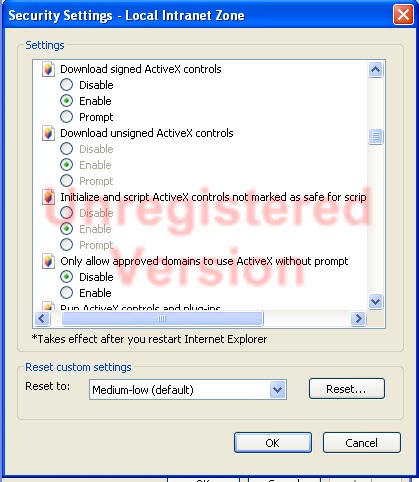
Occasionally I run into a user that gets the Automation server can't create object error message. This is typically caused by a method in JavaScript that attempts to create an ActiveXObject for something like evaluating XML or creating a GUID by using the Scriptlet.TypeLib ActiveX object. To address this issue you need to go to
Internet Explorer Tools > Internet Options > Security > Local Intranet
and hit the ‘Custom level...’ button (IMAGE 1). This will cause the 'Security Settings - Local Intranet Zone' (IMAGE 2) to display. From this form you need to scroll down to the 'ActiveX controls and plug-ins' section and then enable the
Initialize and script ActiveX controls not marked as safe for scripting
and then click the OK button on the form. Then click the Apply button on the Internet Options form and restart Internet Explorer to have the changes take effect. Most times this will address this issue and allow the JavaScript on the form to work.
IMAGE 1

IMAGE 2
Thursday, September 16, 2010
Bit field events
Are you struggling to get the onchange event to fire on a checkbox or radio button? Are you clearing your cache and refreshing your page and seeing no results? Well just the other day one of the other members on my team was having this issue and he came to me for some help. He had something like this
and could not understand why he was not getting the alert when he clicked on the radio buttons for the bit field.
It only took me a second to see what was happening. First the onchange event will not fire until the radio button group looses focus or the blur() event is called on the radio button. After explaining this to my teammate I got the next logical question of, “Well how do you make the event fire when the user clicks on the radio button?” This was an easy one to answer, I said, “Replace onchange with onclick.” So he changed his to code to look like this
So to recap for a checkbox or radio button
crmForm.all.new_bit.onchange = function() {
  alert(“I changed”);
};
It only took me a second to see what was happening. First the onchange event will not fire until the radio button group looses focus or the blur() event is called on the radio button. After explaining this to my teammate I got the next logical question of, “Well how do you make the event fire when the user clicks on the radio button?” This was an easy one to answer, I said, “Replace onchange with onclick.” So he changed his to code to look like this
crmForm.all.new_bit.onclick = function() {
  alert(“I changed”);
};
- onchange does not fire until radio button looses focus or blur() is called
- Use onclick if you want an event to fire as soon as a radio button is clicked.
Subscribe to:
Posts (Atom)